Filters
A filter sorts mail for you as it arrives: label it, keep it out of the inbox, star it, bin it, or push its attachments into a connected service. They live at Settings → Filters.
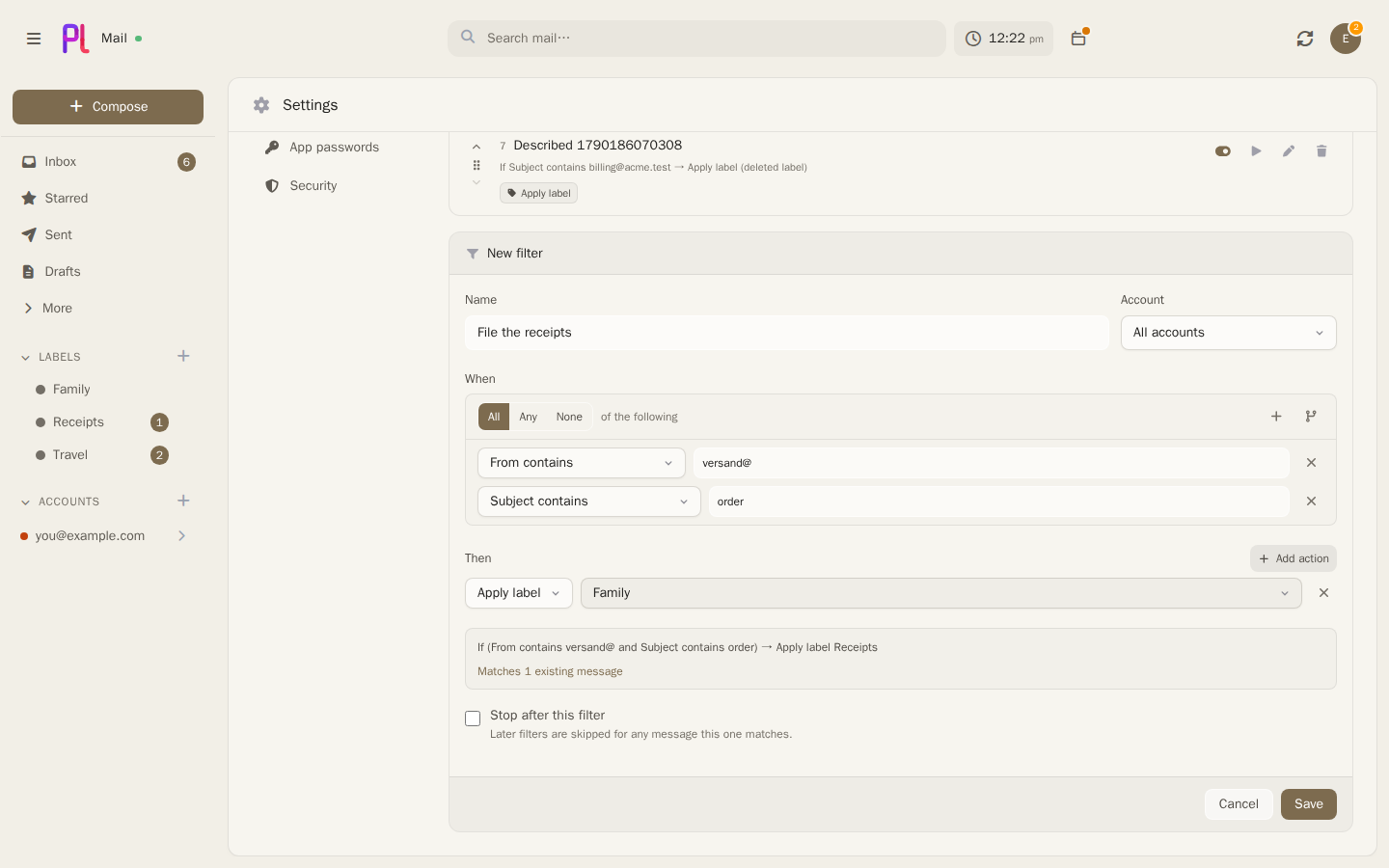
What a filter is made of
Four things: a name, an optional account it is scoped to, a tree of conditions, and a list of actions. The editor opens beside the list in its own frame, so building one does not lose your place.
The account selector defaults to All accounts. Scoping a filter to one account is the usual thing to want, and it matters more than it looks — see the trap about conditionless rules below.
Conditions
Conditions are a tree. Every group states whether All, Any or None of the following must hold, and groups nest as deep as the rule needs. Add condition adds a test to the current group; Add group nests another group inside it.
| Condition | What it tests |
|---|---|
| From contains | Sender address or display name |
| From is exactly | The sender's whole address, and nothing else — not part of an address, and not the display name |
| Sender's domain is | Everything after the @ of the sender's address, whole. Enter it without the @. A subdomain is a different domain |
| To contains, Cc contains, Bcc contains | The corresponding address list |
| Subject contains | The subject line |
| Body contains | The message body |
| Anywhere in the message | Full-text, stemmed — not a substring scan |
| Attachment named | Attachment filenames |
| Mailing list is | The canonicalised List-Id header |
| Has label / Does not have label | A label you own |
| Larger than (bytes) / Smaller than (bytes) | Message size |
| Received after / Received before | A date |
| Has an attachment | Yes or no |
| Is / Is not | One of: read, starred, a draft, replied to |
Anywhere in the message is the one worth singling out. It runs against the same generated full-text column search uses, so it stems properly — which is why matching is done by Postgres and not in PHP. There was briefly a second, in-memory matcher so a message could be tested without a round trip; two implementations of "what this filter means" is a standing invitation to drift, and the symptom of drift here is mail quietly filed in the wrong place.
A filter with no conditions at all is allowed, and means every message it is scoped to. That is how "label everything arriving in this account" is written.
Actions
| Action | Effect |
|---|---|
| Apply label | Adds one of your labels, creating its binding on the message's account |
| Remove label | Takes one off |
| Mark as read | |
| Star it | |
| Skip inbox | Removes the Inbox label — archiving, in other words |
| Move to trash | |
| Mark as spam | |
| Save attachments to | Uploads the message's attachments to a connected service |
| File in category | Files the mail under one of your own inbox tabs. Only offered once you have made one — see Filing into your own tabs |
At least one action is required; a filter with none would do nothing, and the editor says so rather than saving it.
Skip inbox, move to trash and mark as spam are all "leave the inbox", differing only in where the message lands afterwards. Each is pushed to the provider as one operation rather than as a sequence of label changes, because a Gmail label swap and an IMAP folder move carry their own semantics.
Save attachments to only offers services plMail can upload to, and only ones you have connected — see Files and integrations. The upload itself is queued rather than performed inside the sync loop, so a service that is down slows nothing down, and messages without attachments are skipped before anything is queued.
The plain-English restatement
As you build a filter, the editor shows it back to you as a sentence: If Subject contains invoice → Apply label Receipts. Underneath it, a live count of how much of the mail you already have would match.
Reading a filter back in words is how you catch an All that should have been an Any — the tree looks equally correct either way. The sentence is built on the server, not in the browser, so there is exactly one implementation of "what this rule says" and it is properly translated.
The sentence names labels and services rather than ids, and says (deleted label) or (disconnected service) where one has gone missing underneath the rule.
The count is scoped to the same account the rule is, so the number and the sentence cannot describe different things. It is capped at 500 — beyond that it reads Matches 500+ existing messages — because the question being answered is "is this filter roughly right", and an exact count over a large mailbox costs a full scan to tell you something you do not need.
None of is spelled out rather than written as a NOT, because NOT over several conditions means
"none of these" and reads to most people as "not all of these".
Order, and stopping
Filters run in the order they are listed, and can be dragged to reorder. Stop after this filter makes a match final: later filters skip any message this one claimed.
Order is not cosmetic here the way account order is — combined with stop-after it decides which rule wins.
Each row also has Enable filter / Disable filter, so a rule can be parked without being deleted, and Delete filter. Deleting a filter leaves the mail it already sorted exactly where it is.
When filters run
On mail as it arrives, once per batch of newly synced messages, after threading. Everything a condition looks at has already been written by then.
Two paths deliberately never trigger a filter: the IMAP "Gmailify claim" branch, and Gmail's enrichment of messages it already has. Both re-point rows that already exist rather than importing new mail, and a rule firing there would re-file mail you had already sorted by hand.
A broken filter never fails a sync. A rule whose conditions no longer compile is skipped with a warning, and an action that throws is logged and the message left alone.
Applying a filter to mail that already arrived
Apply to existing mail on a saved filter walks your whole mailbox and applies it to everything it matches. It is confirmed first, because it can move and relabel a great deal of mail at once.
The run is queued rather than performed in the request — it has to reach every matching message, which over a real mailbox is far more than a web request should attempt. Progress is written to the filter after every batch of 200, so the row reads Applying… 1,400 so far and keeps reading that on a reload, on another device, or after you close the tab. It ends as Applied to N messages, or Run stopped partway — N messages were done if something failed.
A filter already running refuses to start again: re-running mid-flight would double-count progress and race the handler's writes.
Filing into your own tabs
A filter can put mail into an inbox tab of your own. Make the tab first, under Settings → General → Your own tabs; then add a filter whose action is File in category and pick it. Any condition works. For "everything from my parcel carriers" it is Sender's domain is, one row per carrier, inside an Any group:
All of the following
  Any of the following
    Sender's domain is mondialrelay.fr
    Sender's domain is chronopost.fr
    Sender's domain is dhl.de
  None of the following
    Sender's domain is e-mail.mondialrelay.fr
    Subject contains satisfaction
→ File in category Shipping
Keeping marketing out is the second group. A carrier's newsletters often come from another address than its delivery notices, but nothing in the headers tells the two apart — a real delivery notice can carry an unsubscribe link just as a newsletter does — so you say it in the filter. Mail the None of group excludes is simply not filed by this filter. It is sorted the way it would have been anyway, so the newsletter stays in Promotions. The live count of matching mail and the sentence under the editor read the whole thing back before you save it — a wrong None of is easy to see there and hard to see afterwards.
What the action will and will not file:
- Only mail whose sender passes authentication. The receiving mail server records whether the message really came from the domain in its From line, and plMail reads that verdict (the same one that decides whether a calendar invitation may be applied without asking). A forged "your parcel is waiting" from a carrier's domain is therefore not filed by this filter — it stays where the ordinary rules put it, instead of sitting in your Shipping tab beside the real ones. Mail that fails the check is not filed, and neither is mail plMail cannot check; see "Things that bite" for what this does and does not guarantee.
- On Gmail accounts too. Google's categories outrank plMail's own sorting unless you say otherwise, but a filter is an instruction you wrote, and it outranks both.
- Nothing but a tab. The action does not touch labels, does not archive, does not move anything to Spam and does not mark anything read. The Android app shows your tabs; other mail apps that connect over JMAP keep seeing the five built-in categories.
A conversation is in one tab. It is in yours when its newest message was filed there, so a newer message no filter claims takes it back out, the way a newer Promotions message takes a conversation out of Updates. A conversation you drag onto a tab stays there whatever a filter says.
When two filters would file the same message, the one that runs last decides; Stop after this filter on the earlier one is how you keep its choice.
Deleting a tab puts its mail back in the tab it would otherwise be in. No mail is deleted, and a filter that filed into it keeps its place and reads (deleted category) until you point it somewhere else.
Where to read further
- Mail — labels, search, and the operations these actions perform.
- Tabs of your own — making them, dragging into them, and what the message panel says about them.
- Files and integrations — connecting the services Save attachments to offers.
- Mail ingest — where in the pipeline filters sit.
- JMAP — the filter vocabulary as a client sees it.
Things that bite
A filter with no conditions and no account means every message in every account. It is a legal filter and a useful one when scoped, but scoped to All accounts it is a rule that catches everything you own — and Apply to existing mail on it then reaches the entire mailbox. The restatement says so in as many words; read it before saving.
The match count is capped at 500 and the run is not. "Matches 500+" is not an estimate of how much Apply to existing mail will touch. That number can be any size.
Filters only see mail arriving from now on. Saving one does nothing to mail already synced until you press Apply to existing mail.
A malformed action is dropped silently; a malformed condition is refused loudly. That asymmetry is deliberate — a dropped condition silently widens a rule, which is the dangerous direction, whereas a dropped action can only ever be a client bug and dropping it is the conservative outcome.
Deleting a label or disconnecting a service does not delete the rules referring to it. They keep running with that action doing nothing, and the restatement marks the gap as (deleted label) or (disconnected service).
Stop-after only applies within one run. It decides which later filters skip a message in the same pass; it is not a permanent mark on the message.
Ticking "Save attachments to" for a service that can only be read from is impossible by construction — the list only offers upload-capable connections. If the one you want is missing, that is why.
"File in category" files nothing on an account whose receiving server plMail cannot identify. It trusts only the authentication verdict a server it can tell is yours wrote into the message — for an IMAP account, one whose name is on the same domain as the account's IMAP host. On a mailbox where that cannot be told (a host that stamps nothing, or stamps under another name), a filter that files into a tab matches, runs and files nothing. That is the price of a tab that cannot be filled with forgeries, and it is chosen, not a bug.
The check is about the message, and it only helps if the filter names the sender. A filter whose conditions do not pin the sender — "Subject contains parcel", say — files any sender whose own domain passes authentication, a lookalike domain included: authentication proves a message came from the domain it claims, not that the domain is the one you meant. Pin the sender with Sender's domain is. And a tab holds conversations, not messages: a forged message that replies into a genuine conversation (the same sender address, a "Re:" subject) can join it, and a conversation you dragged into a tab stays there whatever joins it afterwards.
A filing is remembered, and editing or deleting the filter does not undo it. Like every other action, it acts on mail and leaves the result: mail a filter filed stays filed. To re-file, change the filter and press Apply to existing mail; to empty a tab, drag its conversations out or delete the tab.
The last filter to file a message wins — the opposite of what the order of a list of rules usually suggests. Put a broad filter above the specific ones, or give a specific one Stop after this filter.
This page is generated from docs/features/filters.md. Edit it there — changes made here are overwritten on the next push to main.